

How to Use The Bunched App: Your Complete Guide
Updated: Jul 30
Whether you're sharing your baby's first steps, keeping grandparents up to date, or simply collecting everyday family moments, Bunched makes it easy to keep everyone connected in one private place.
This guide will walk you through everything you need to know to get started.
Download Bunched
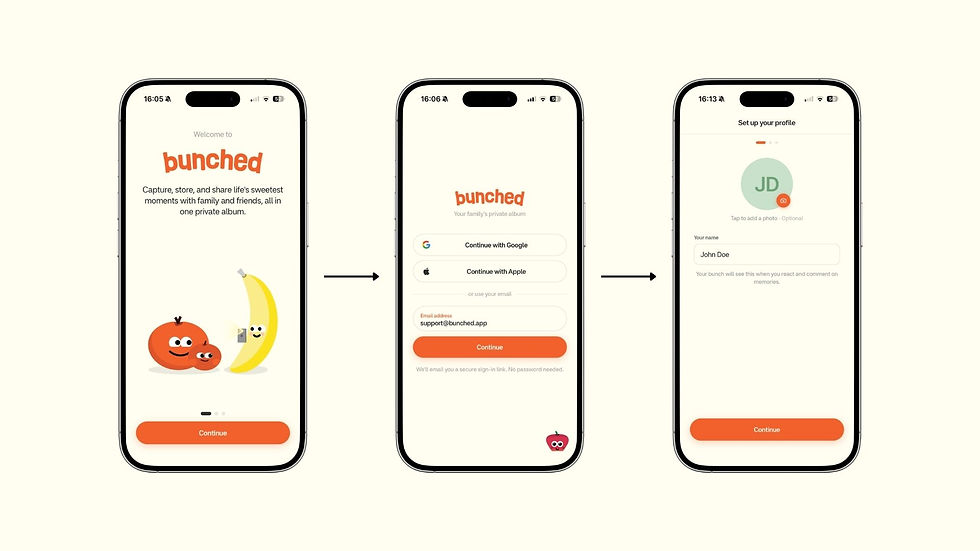
Getting started takes just a couple of minutes.
Simply download Bunched from the Apple App Store or Google Play Store on your iPhone or Android device.
Once installed, open the app and create your account.
You can sign up using:
Apple
Google
Email
During setup, you'll be asked whether you'd like to receive notifications and set a few simple preferences. Once that's done, you're ready to create your first bunch.
Create Your First Bunch
Your bunch is your own private family album.
Give your bunch a name, then invite the people you'd like to share memories with.
Whether that's your immediate family, grandparents, friends, or relatives abroad, only the people you invite can access your bunch.

Understanding the Home Screen
Once you're inside Bunched, everything is designed to be simple and easy to navigate.
The bottom navigation contains three main sections.

Your Memories
The first tab is where all your photos and videos live.
At the top of the screen, you'll see your current bunch. If you have multiple bunches, simply tap the dropdown beside the bunch name to switch between them.
Whether you have one bunch for family, another for grandparents, or one for close friends, switching between them only takes a tap.
Adding Photos, Videos and Family Members
The large orange + button is where you'll spend most of your time.
From here you can:
Upload photos from your library
Upload videos from your library
Take a photo in the app
Invite family and friends
If you're selecting a large number of photos or videos from your camera roll, your phone may take a few moments to prepare everything before uploading.
Upload Your First Memory
After selecting your media, simply:
Add a caption
Tag family members
Tap Upload
Your memories will automatically appear inside your bunch for everyone you've invited to enjoy.
Family members can then:
View your uploads
React with emojis
Leave comments
Join the conversation around every memory

Finding Memories is Easy
Unlike family group chats or social media feeds where photos quickly disappear, Bunched keeps everything organised automatically.
Your memories are sorted the way you like them, making it easy to revisit life's sweetest moments.
You can filter your memories by:
Person
Date taken
Date added
Most popular
This makes finding a specific memory incredibly simple, even years later.

Invite More Family Members
At the top of your bunch you'll find the Invite button.
You can invite people in several ways:
Contacts
Email
Shareable link
Unique invite code
Only the people you invite can access your bunch, helping keep every memory private and secure.

View Every Memory in Detail
Tap any photo or video to open it full screen.
From there you can:
Zoom into photos
Watch videos
React
Leave comments
Swipe between memories
It's a simple, enjoyable way to look back through your family's memories together.

Discover Your Latest Memory
At the top of your bunch you'll also find your Latest Memory.
This highlights the newest upload, along with its caption, so everyone can quickly catch up with what's been shared most recently.

Watch Memories as a Slideshow
Want to sit back and enjoy your family album?
Tap the Slideshow button to automatically play through every photo and video in your bunch, creating a simple viewing experience that's perfect for reminiscing together.
Stay Up to Date
The notification bell keeps you informed whenever something new happens.
You'll receive updates for things like:
New uploads
Reactions
Comments
Family activity
So you'll never miss an important moment.
Manage Your Bunch
The final tab in the bottom navigation contains your bunch settings.
From here you can:
Manage members
Assign admins
Change your bunch name
Manage invites
Control access permissions
Allow uploads
Allow downloads
Access Grandparent Mode
We'll cover Grandparent Mode in a separate guide here.

Sharing Memories Outside Your Bunch
When you share a memory with someone who's already part of your bunch, they'll be taken straight to the app to view it.
If someone isn't a member, they'll only see a blurred preview and can request access to join your bunch.
You'll always have complete control over who can view your family's memories by accepting or declining their request.

Why Families Choose Bunched
Most platforms weren't designed for family memories.
Photos disappear inside busy group chats or become mixed into social feeds filled with ads, algorithms, and distractions.
Bunched is different.
Built specifically for families, Bunched gives you one secure place to store, organise, and share your photos and videos with the people who matter most. Every bunch is invite-only, fully private, and protected with end-to-end encryption, so your memories stay exactly where they belong - with your family.
Whether you're sharing everyday moments, keeping grandparents involved, or staying connected with loved ones across the world, Bunched helps you keep every memory together.
Start Your First Bunch Today
Creating your first bunch only takes a few minutes.
Download Bunched, invite the people who matter most, and start sharing life's sweetest moments in one private, secure family album.


